

You are in your home studio, a mix session in Pro Tools is open, and you need to lay down a quick bass line or tweak a virtual synth. Reaching for the mouse to click in notes is slow and uninspiring. A dedicated MIDI controller changes everything, giving you tactile, expressive control over your software instruments and DAW. This guide reviews the 7 best MIDI controllers for Pro Tools in 2026, covering compact beat makers, full-size keyboards, and specialized control surfaces for every producer.
Whether you are a beginner building your first setup or a seasoned producer looking to upgrade, we evaluated these controllers for their integration with Pro Tools, build quality, and creative features. For more on choosing the right tool for your studio, check out our guide on the best MIDI keyboard for music production.



Buying Guide
Key Count and Key Size
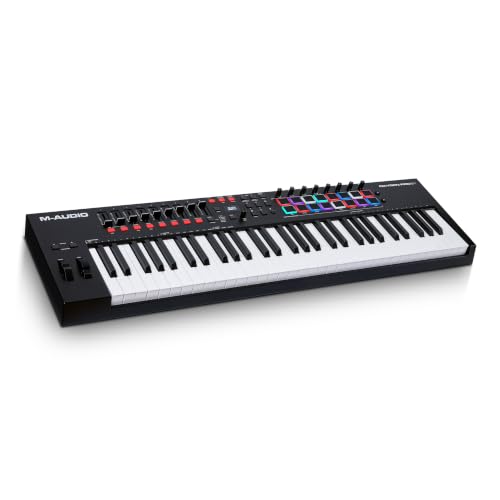
The number of keys directly affects your playing range. A 25-key mini controller, like the Akai Professional MPK Mini IV 25-Key USB-C MIDI, is ultra-portable and great for beat making or bass lines, but limits two-handed playing. A 61-key model, such as the M-AUDIO Oxygen Pro 61 USB MIDI Keyboard Controller, offers full octave range for complex compositions and piano-style parts.
Mini keys save space but have a different feel than full-size keys. If you are a pianist, prioritize full-size, velocity-sensitive keys for expressive dynamics. For a compact setup, mini keys are perfectly fine for triggering samples and simple melodies. If you are on a tight budget, our picks for the best cheap MIDI controller may help you decide.
Pads, Knobs, and Faders
Beyond keys, the number and type of assignable controls matter. Drum pads are essential for finger-drumming and triggering one-shot samples. The Akai Professional LPD8 and MPK Mini models feature 8 responsive MPC pads with RGB feedback. Knobs and faders let you control virtual instrument parameters, EQ, and mixer levels directly from the hardware.
For deep DAW control, the Akai Professional MIDImix offers 24 knobs, 16 buttons, and 9 faders. This level of tactile control speeds up mixing and sound design in Pro Tools, letting you automate parameters without touching a mouse. If you work with Ableton Live as well, the best midi controller for ableton live 12 guide has tailored recommendations.
Connectivity and Portability
USB-C connectivity is now standard for modern controllers, offering fast data transfer and power delivery. All models reviewed here are USB-powered and plug-and-play with Mac and PC, requiring no extra drivers for Pro Tools. For mobile producers, a compact controller like the Donner DMK25 Pro fits easily in a laptop bag.
Some controllers also include 5-pin MIDI Out for connecting to hardware synths or modular gear. The Akai Professional MPK Mini Plus adds CV/Gate I/O, making it a bridge between your DAW and analog setups. For more portable options, see our roundup of the best MIDI keyboard for laptop.
Built-in Arpeggiator and Scale Modes
Creative tools like arpeggiators, chord modes, and scale modes can spark new ideas and simplify performance. The Akai Professional MPK Mini IV and MPK Mini Plus include an arpeggiator with Pattern, Freeze, and Mutate functions, plus Chord and Scale modes. These features are invaluable for songwriting and live jamming, allowing you to quickly generate complex musical phrases.
The Donner DMK25 Pro also offers intelligent dynamic scale mode and arpeggio functions. These tools help beginners play correct notes within a scale and add variation to their performances. For a detailed look at a compact option, read our M-Audio keystation mini 32 review.
Final Thoughts
Choosing the best MIDI controller for Pro Tools in 2026 comes down to your specific needs: for a portable, feature-packed beat maker that excels at finger drumming and melody creation, the Akai Professional MPK Mini IV 25-Key USB-C MIDI is an outstanding all-rounder, while the M-AUDIO Oxygen Pro 61 USB MIDI Keyboard Controller offers a full-size, expressive keyboard with deep DAW integration for producers who need a traditional piano feel and extensive control.
Frequently Asked Questions
Do I need a MIDI controller for Pro Tools? A MIDI controller is not required, but it dramatically speeds up your workflow for recording virtual instruments, automating parameters, and beat production. It is highly recommended for any music producer using Pro Tools.
What is the difference between a MIDI keyboard and a MIDI pad controller? A MIDI keyboard has piano-style keys for playing melodies and chords, while a MIDI pad controller has drum pads for triggering samples and beats. Many controllers, like the Akai MPK Mini, combine both for versatile music production.
Can I use these controllers with other DAWs besides Pro Tools? Yes, all the controllers reviewed are class-compliant and work with any DAW that supports MIDI, including Ableton Live, Logic Pro, FL Studio, and Studio One. They are universal tools for any digital audio workstation.
How do I set up a MIDI controller in Pro Tools? Simply connect the controller via USB, open Pro Tools, create a MIDI track, and select the controller as the MIDI input. Most modern controllers are plug-and-play and require no additional drivers. For more tips, see our guide on the best MIDI keyboard for music production.


