

You are deep in a creative flow with Ableton Live 12, your screen a mosaic of colorful clips and virtual instruments. The only thing slowing you down is the mouse. Every click, every drag, every menu dive breaks your concentration. You need a tactile, hands-on controller that lets you launch clips, tweak faders, and play melodies without ever touching a trackpad. That is where a dedicated MIDI controller for Ableton Live 12 becomes essential. This guide covers the top grid and pad controllers that integrate seamlessly with Ableton Live 12, helping you choose the right tool for your workflow, whether you are a live performer, a studio producer, or a beatmaker just starting out. For more context on compact controllers, read our guide on the best 25 key MIDI keyboards for 2026.



Buying Guide
Integration with Ableton Live 12
The core reason you are buying a MIDI controller is to control Ableton Live 12 without a mouse. Look for controllers that offer 1-to-1 mapping with Ableton’s session view. This means the colors and positions of the pads on your hardware match the clips in your software. The best controllers come pre-mapped for Ableton Live 12, so you can plug in and start launching clips immediately.
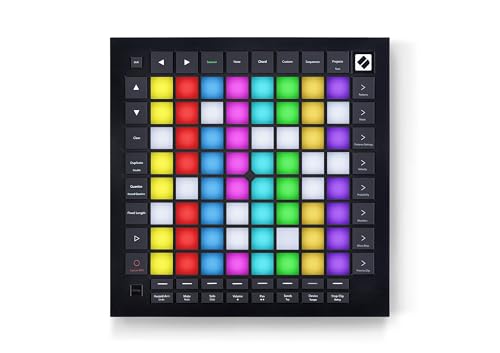
Some controllers, like the Novation Launchpad Pro MK3, offer deep integration that goes beyond clip launching. They let you access mixer controls, transport functions, and even the sequencer from the grid. For a more budget-friendly option, the Akai APC Mini MK2 is also pre-mapped for Ableton Live 12, making setup effortless.
Pad Quality and Expressiveness
Not all pads are created equal. Basic pads simply trigger a note or clip at a fixed velocity. More expressive pads are velocity-sensitive, meaning the harder you hit them, the louder or more intense the sound. Pressure-sensitive pads take it a step further, allowing you to modulate parameters like filter cutoff or pitch bend after the initial hit.
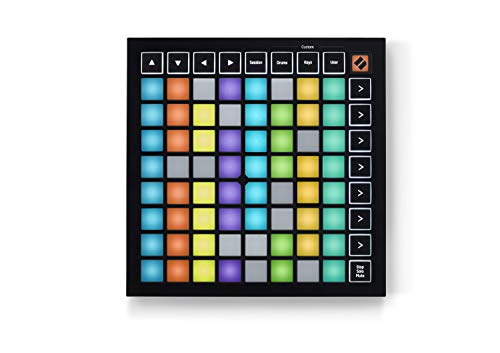
If you plan to play melodic parts or drum racks, velocity sensitivity is a must. The PreSonus ATOM and Novation Launchpad Pro MK3 both offer velocity and pressure sensitivity. The Launchpad Mini MK3, while excellent for clip launching, uses basic pads that are not velocity-sensitive. Think about your primary use case before choosing.
Portability and Build Quality
If you travel to gigs or collaborate in different studios, portability matters. The Akai APC Mini MK2 and Novation Launchpad Mini MK3 are both compact, lightweight, and bus-powered via USB. They fit easily into a laptop bag. The Novation Launchpad Pro MK3 and PreSonus ATOM are larger and heavier, built for a permanent studio setup.
Build quality varies with price. The Launchpad Pro MK3 feels rugged and premium, while the APC Mini MK2 is more plastic but still sturdy. For a versatile option that balances portability and features, the best MIDI controller for iPad often overlaps with Ableton Live 12 needs, as many controllers work with both.
Additional Controls and Customization
Beyond pads, consider what extra controls you need. Faders are great for mixing, encoders for tweaking synth parameters, and buttons for transport controls. The Akai APC Mini MK2 includes nine assignable faders, while the PreSonus ATOM offers four endless rotary encoders and 20 assignable buttons. The Novation Launchpad Pro MK3 has MIDI I/O for connecting to external hardware.
Customization software is also key. Novation’s Components app lets you remap every pad and control on the Launchpad Mini and Pro. This flexibility ensures your controller grows with your workflow. For more insights on software integration, check our article on the best MIDI keyboard software for 2026.
Final Thoughts
Choosing the right MIDI controller for Ableton Live 12 comes down to your performance style and budget. For the best balance of portability, expressiveness, and deep Ableton integration, the Novation Launchpad Pro MK3 is our top recommendation for serious producers and live performers. If you are on a tighter budget or need a compact controller for clip launching on the go, the Akai Professional APC Mini MK2 offers incredible value with its pre-mapped Ableton integration and assignable faders, making it an ideal entry point into hands-on music production.
Frequently Asked Questions
Can I use these MIDI controllers with other DAWs besides Ableton Live 12?
Yes, all of these controllers work with any DAW that supports MIDI input, such as Logic Pro, FL Studio, and Studio One. However, their deepest integration is with Ableton Live. The Novation Launchpad Mini MK3, for instance, also works with Logic Pro’s Live Loops feature.
Do I need a MIDI controller if I already have a keyboard?
A MIDI pad controller offers a different workflow than a keyboard. It is optimized for launching clips, triggering samples, and controlling mixer functions. If you primarily play melodies, a keyboard is better. For live looping and performance, a grid controller is more intuitive. See our guide on the best 25 key MIDI keyboards for a keyboard-focused alternative.
What is the difference between the Novation Launchpad Mini MK3 and the Launchpad Pro MK3?
The Launchpad Mini MK3 is a more affordable, compact controller with basic pads. It is ideal for clip launching. The Launchpad Pro MK3 has velocity and pressure-sensitive pads, a built-in sequencer, and MIDI I/O, making it suitable for expressive playing and hardware integration. The price difference reflects these advanced features.
How do I set up a MIDI controller with Ableton Live 12?
Most controllers are plug-and-play. Connect the controller via USB, open Ableton Live 12, and go to Preferences > Link/MIDI. Ensure the controller is enabled as a Control Surface. For pre-mapped controllers like the Akai APC Mini MK2, no further configuration is needed. For others, use the manufacturer’s software to customize mappings.


