You just pulled your iPad Pro 12.9 out of your bag, ready to knock out some emails or draft a report, but the on-screen keyboard eats half the display and your neck is already aching from hunching over. A dedicated keyboard stand transforms your tablet into a laptop-like workstation, letting you type comfortably and view content at eye level. In this guide, we evaluate the best iPad Pro 12.9 keyboard stand options of 2026, covering magnetic floating stands, multi-touch trackpads, and backlit keys. Whether you’re a student, remote worker, or creative pro, we’ll help you find a model that fits your workflow and budget.
We’ve researched and compared eight leading keyboard cases, from budget-friendly folios to premium magnetic stands. Our picks prioritize stability, typing comfort, and ease of use, so you can make an informed decision without wading through endless listings. If you’re also exploring music production setups, check out our guide on the best MIDI keyboard for laptop for portable creativity.





Buying Guide
Magnetic Stand Strength and Stability
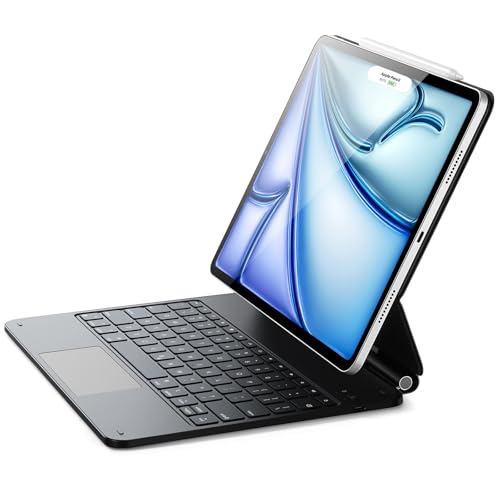
A keyboard stand is only as good as its hinge and magnets. Look for a floating cantilever design that holds your iPad Pro 12.9 at your preferred angle without wobbling. Strong magnets, often rated in kilograms of force, ensure the tablet stays put during intense typing sessions or when you tap the screen.
Models like the ESR for iPad Pro 12.9 Keyboard Case and the typecase Edge series feature ultra-strong magnetic connections that snap into place instantly. A stable base also allows you to adjust the viewing angle from 0 to 130 degrees, giving you flexibility for typing, drawing, or watching media.
Trackpad Precision and Gesture Support
If you plan to edit documents or navigate iPadOS without touching the screen, a high-quality trackpad is essential. Look for multi-touch support that recognizes all native gestures: scrolling, swiping between apps, and pinch-to-zoom. A larger trackpad surface area also improves accuracy and reduces hand fatigue.
Several picks, such as the Harvopu for iPad Air 13 Inch (M4/M3/M2) and the runelk Keyboard Case for iPad Air 13, offer precision trackpads with full gesture support. For a deeper dive into keyboard options for music software, our best MIDI keyboard for Dorico article provides useful insights.
Backlit Keys and Battery Life
Working in low-light conditions? Backlit keys are a game-changer. Look for adjustable brightness levels and multiple color options to match your environment. Battery life varies widely: some keyboards last weeks on a single charge, while others need frequent topping up.
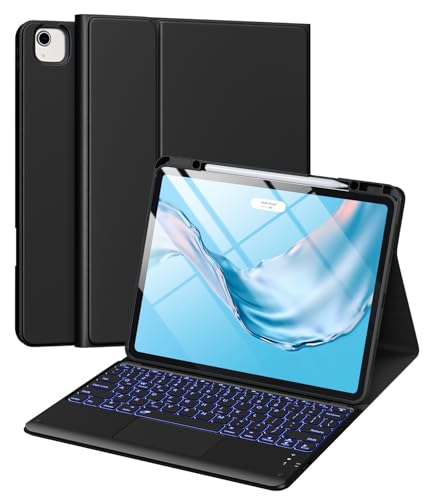
The typecase Edge Magic-Style Magnetic Keyboard Case offers 11 colors and 3 brightness levels, while the LENRICH Keyboard Case for iPad Pro 12.9 inch provides up to 45 hours of use after a 3-hour charge. Consider your typical usage patterns to choose a model that won’t leave you stranded.
Compatibility and Protection
Not all keyboard stands fit every iPad Pro 12.9 generation. Verify compatibility with your specific model number (e.g., 6th gen 2022, 5th gen 2021, etc.) before purchasing. Many cases also provide full front and back coverage, protecting your device from scratches and bumps. Some include a magnetic clasp to secure your Apple Pencil.
The ESR for iPad Air 13/Pro 12.9 Inch Case Keyboard is compatible with multiple generations and offers a detachable back case for versatile use. If you’re also into digital pianos, you might appreciate our comparison of yamaha vs kawai digital pianos for home studios.
Final Thoughts
Choosing the right keyboard stand for your iPad Pro 12.9 comes down to your priorities: if you want a premium, Apple-like experience with a floating cantilever stand and vibrant backlighting, go with the typecase Edge Magic-Style Magnetic Keyboard Case; for a budget-friendly option that still delivers a responsive trackpad and multiple viewing angles, the Harvopu for iPad Air 13 Inch (M4/M3/M2) is an excellent choice. Both offer solid build quality and features that enhance productivity, so you can’t go wrong.
Frequently Asked Questions
Will a keyboard stand work with my iPad Pro 12.9 model?
Most keyboard stands are designed for specific generations. Check the product description for model numbers like A2436, A2378, or A2229. The typecase Edge and ESR cases cover 3rd through 6th gen iPad Pro 12.9, so they’re widely compatible.
Can I use the keyboard case without the keyboard?
Yes, many magnetic cases allow you to detach the keyboard and use the back cover as a standalone stand. The ESR Rebound 360 series, for example, lets you remove the keyboard and use the case in multiple modes, including portrait orientation for FaceTime or reading.
How do I connect the keyboard to my iPad?
Most keyboards pair via Bluetooth. Turn on the keyboard, enable Bluetooth on your iPad, and select the device from the list. Some models, like the Harvopu, require pressing Fn + C for 2 seconds to enter pairing mode. Once connected, the keyboard reconnects automatically.
Do these keyboard stands work with iPad Air 13-inch models?
Several options, such as the typecase Edge and ESR Rebound, are explicitly compatible with iPad Air 13-inch (M4, M3, M2) in addition to iPad Pro 12.9. Always verify the model numbers in the compatibility list to ensure a proper fit.